
In this article:
If you delete a poll or question in Poll, it’s moved to your Trash, where you can either restore it or permanently delete it later. Restoring a poll also restores all of its responses.
Delete a Poll
- Go to Polls → My polls (open the folder if needed).
- Do one of the following:
- Select the ⋯ menu on the poll's row and choose Trash.
- Tick the checkbox next to one or more polls and select Trash in the selection bar.
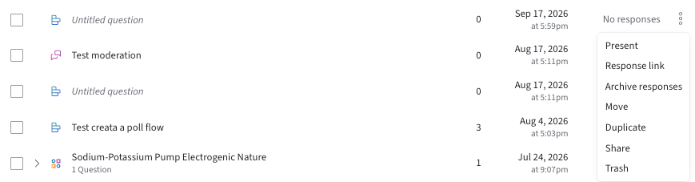
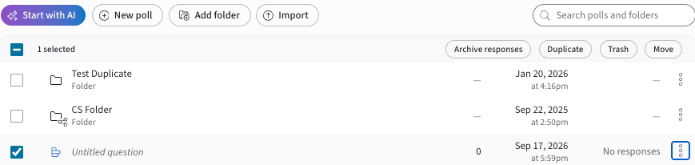
The poll is immediately removed from My polls and moved to Trash, the third tab on the Polls page (My polls · Shared with me · Trash). Admins and team members can still access deleted polls until they are permanently deleted.
Note: Polls or questions will only remain in the Trash for 30 days after removal before being permanently deleted forever. If you wish to recover your poll, please do so before the 30-day mark.
Restoring a Deleted Poll
Go to Polls and open the Trash tab.
Just like your computer’s trash bin, the Trash page gives you the option of restoring polls or deleting them forever. Check the box of the poll you want to restore or delete, then select the appropriate button at the top.
When you Restore, the poll will reappear in your My polls list with all responses intact.
Selecting Delete permanently deletes the poll from our database. A reminder that the Trash page permanently deletes polls after 30 days, so you do not need to maintain the Trash page. Once a poll is permanently deleted, the poll and its responses will be gone forever and cannot be restored, not even by admins.
What happens when I delete a folder?
- Deleting a folder sends all polls inside it to Trash.
- However, the folder structure itself is not preserved — only the individual polls are moved to Trash.